Smart home essentials are the basic devices that make your home easier, safer, and cheaper to run. You control them with your phone, your voice, or simple schedules you set once. A few good picks can turn your lights, heat, and locks into helpers that work on their own.
Many people think a smart home costs a lot or needs an expert. That idea is no longer true. Today, a beginner can start with one smart plug and grow the system one room at a time.
This guide explains each device in plain words. You will learn what to buy first, what it costs, and how to keep your data safe. We also cover Matter, the new standard that lets devices from different brands work together.
Why Smart Home Essentials Matter in 2026
A connected home saves you time every single day. Lights turn on when you walk in, and the heater lowers itself when you leave. You stop worrying about whether you locked the door, because your phone tells you.
These devices also help you cut energy waste. A smart thermostat and a few smart plugs can trim your monthly power bill. Over a year, those small savings often pay back the cost of the devices.
Safety is another big reason. Video doorbells, smart locks, and leak sensors warn you about problems right away. Families with older parents or young kids get extra peace of mind from these alerts.
Start With a Smart Speaker or Smart Hub
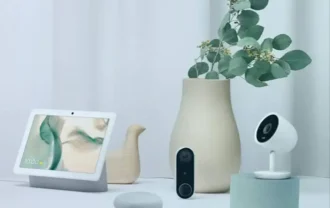
A smart speaker or hub is the “brain” of your connected home. It links your devices and lets you control them in one app or with your voice. Popular choices include Amazon Echo, Google Nest, and Apple HomePod.
Pick the system that matches the phone you already use. iPhone users often enjoy Apple Home, while Android users find Google Home easier. Amazon Alexa works well with both and supports a huge list of devices.
A hub also runs automations, which are simple rules you create once. For example, you can tell your hub to turn off every light at 11 p.m. You can also make the porch light switch on when your doorbell spots motion.
What Is Matter and Why Should You Care?
Matter is a shared language that lets smart devices from different brands talk to each other. Matter 1.0 launched in October 2022 and first supported lights, thermostats, locks, and blinds. The Connectivity Standards Alliance runs it, with backing from Amazon, Apple, Google, and Samsung.
The standard keeps growing every year. Matter 1.5 added support for cameras, and Matter 1.6 arrived in June 2026 with easier setup and device sharing. Big brands like IKEA now build whole product lines around it.
Here is the simple rule: look for the Matter logo when you shop for smart home essentials. A Matter device works with Alexa, Google, Apple, and SmartThings, so you never get stuck with one brand. Many Matter devices also use Thread, a fast, low-power network that gets stronger as you add devices.
Smart Lighting – The Easiest First Step
Smart bulbs are the most popular way to start a smart home. You screw them into a normal lamp, connect them in an app, and you are done. Then you can dim them, change their color, or set them on a schedule.
Smart bulbs use LED technology, so they already use far less power than old bulbs. Schedules add more savings because lights never stay on in empty rooms. Check our smart lighting ideas for every room for fun ways to use them.
If you rent, bulbs are perfect because you take them with you when you move. Homeowners may prefer smart switches, which control every bulb on one circuit. A switch also keeps working when a guest flips it by hand.
Smart Plugs – Make Old Devices Smart
A smart plug turns almost any normal device into a smart one for a low price. You plug it into the wall and then plug your lamp, fan, or coffee maker into it. Now you can switch that device on or off from your phone.
Smart plugs also help you stop “phantom power,” the energy devices waste while they sit idle. Some models show how much power each device uses. Read our smart plug buying guide to pick a model with energy tracking.
Smart Thermostat – The Biggest Money Saver
Heating and cooling eat up more of your energy bill than almost anything else. A smart thermostat learns your routine and lowers the heat when you sleep or leave. You can also change the temperature from your phone while you are away.
The numbers back this up. According to ENERGY STAR, a certified smart thermostat saves over 8% of heating and cooling energy, or about $50 a year. Homes with high heating and cooling bills can save up to $100 a year.
Before you buy, check that the thermostat works with your heating system. ENERGY STAR notes that most models do not support baseboard heat or in-wall heaters. Your local power company may also offer a rebate, which lowers your cost even more.
Home Security Devices That Protect Your Family
Security tools are some of the most valuable smart home essentials you can own. They watch your home when you cannot and send alerts straight to your phone. Most of them install in under an hour with basic tools.
Smart Locks
A smart lock lets you open your door with your phone, a code, or your fingerprint. You can give a cleaner or a relative a code that works only on certain days. The lock also keeps a record of who came in and when.
Video Doorbells
A video doorbell shows you who stands at your door, even when you are at work. You can talk to delivery drivers and scare off package thieves. Our best video doorbells guide compares top models with and without monthly fees.
Security Cameras and Sensors
Indoor and outdoor cameras record motion and send clips to your phone. Small sensors on doors and windows tell you when someone opens them. Water leak sensors are cheap but can save you thousands by catching a leak early.
Smart smoke and carbon monoxide alarms send alerts to your phone, not just a loud beep at home. That matters when nobody is there to hear the sound. This table shows what each security device does best.
| Device | What It Does | Best For |
|---|---|---|
| Smart lock | Opens with phone, code, or fingerprint | Families, renters with guests, Airbnb hosts |
| Video doorbell | Shows and records visitors at the door | Package safety and checking visitors |
| Security camera | Records motion inside or outside | Watching pets, yards, and driveways |
| Door and window sensor | Alerts when something opens | Low-cost home security |
| Water leak sensor | Warns about leaks and floods | Kitchens, bathrooms, and basements |
| Smart smoke alarm | Sends fire and CO alerts to your phone | Every home, especially when you travel |
How Much Do Smart Home Essentials Cost?
You can build a useful starter setup for less than $300. Prices change with sales, brands, and features, so treat the numbers below as rough guides. Holiday sales like Black Friday often cut prices by 20% to 40%.
| Device | Typical Price (USD, approximate) | Buy Order |
|---|---|---|
| Smart plug | $10–$25 | 1st |
| Smart bulb | $10–$50 each | 1st |
| Smart speaker or hub | $30–$100 | 2nd |
| Water leak sensor | $15–$40 | 2nd |
| Video doorbell | $60–$250 | 3rd |
| Smart thermostat | $100–$280 | 3rd |
| Smart lock | $100–$300 | 4th |
| Security camera | $30–$200 each | 4th |
Start with the cheap items in the first rows and add more as your budget allows. Some cameras and doorbells charge a monthly fee to save video in the cloud. Check that cost before you buy, because it adds up over a year.
Do Not Forget Strong Wi-Fi
Every smart device needs a steady connection to work well. Weak Wi-Fi causes slow responses, missed alerts, and devices that drop offline. If your home has dead spots, a mesh Wi-Fi system spreads a strong signal into every room.
Some new routers also act as a Thread border router for Matter devices. That means you may not need a separate hub at all. Our home Wi-Fi mesh guide explains how to pick the right router.
Simple Setup Tips for Beginners
A little planning makes setup smooth and stress-free. Follow these steps in order for the best results.
- Choose one main app, such as Google Home, Apple Home, or Alexa, and stick with it.
- Name devices clearly, like “Kitchen Light,” so voice commands work every time.
- Group devices by room to control a whole space with one tap or word.
- Build one automation at a time, then test it for a few days.
- Turn on auto-updates so your devices get the newest features and security fixes.
Keep Your Smart Home Private and Secure
Smart devices collect data, so you must protect them like a computer. Use a strong, unique password for every account and turn on two-factor login. This simple step blocks most hacking attempts.
Buy from well-known brands that promise long-term software updates. Cheap no-name devices often stop getting security fixes after a year or two. You can also place smart devices on a separate guest Wi-Fi network to keep your laptop and phone safer.
Frequently Asked Questions
What should I buy first for a smart home?
Start with a smart plug or a smart bulb. Both cost little, install in minutes, and teach you how the apps work. Add a speaker or hub once you own three or four devices.
Do I need a hub for smart home essentials?
Not always, because many Wi-Fi and Matter devices work straight from your phone. A hub becomes helpful when you want voice control and automations across many rooms. Some speakers and routers now include a hub built in.
Do smart devices work without internet?
Some do, but many lose app and voice control when the internet goes down. Matter and Thread devices can often keep running local automations offline. Check the product page for “local control” before you buy.
Can renters use smart home devices?
Yes, renters have plenty of great choices. Smart bulbs, plugs, speakers, and stick-on sensors need no drilling or wiring. You simply unplug them and take them to your next home.
Are smart homes safe from hackers?
Smart homes are safe when you follow basic security habits. Use strong passwords, turn on two-factor login, and keep software updated. Pick trusted brands that release regular security fixes.
Conclusion
Building a connected home does not need a big budget or expert skills. Start with one or two smart home essentials, learn how they work, and grow from there. Choose Matter-certified devices so everything keeps working together in the future.
Focus first on what solves a real problem in your daily life. A smart thermostat cuts bills, a video doorbell protects packages, and smart lights add comfort. With the right smart home essentials, your house becomes safer, smarter, and easier to live in.