Your fridge can now text you when the door stays open. Your washer can tell you when the cycle ends. It sounds like magic, but it is just clever technology. In this guide, you will learn how do smart appliances work, step by step. We keep the language simple, so anyone can follow along.
What Are Smart Appliances?
A smart appliance is a home device that connects to the internet. It does its normal job, such as washing, cooling, or cooking. It also talks to your phone, your voice assistant and other devices.
Think of it as a regular appliance with a small computer inside. That computer gives the machine a brain and a voice. You can control it from anywhere.
Common examples include:
- Smart refrigerators
- Smart washing machines and dryers
- Smart ovens and cooktops
- Smart dishwashers
- Smart thermostats and air conditioners
- Robot vacuums
How Do Smart Appliances Work Inside Your Home?
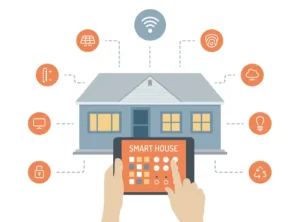
Every smart appliance has four main parts. These parts work like a small team. Each one does a clear job.
1. Sensors collect information. Sensors act like the eyes and ears of the machine. A washer weighs your laundry. A dishwasher checks how dirty the water is. A thermostat reads the room temperature.
2. A microprocessor makes decisions. This tiny chip reads the sensor data. It then picks the best action. For example, it adds more water for a heavy load.
3. A communication module connects the device. This part uses Wi-Fi or Bluetooth. It links the appliance to your router and phone.
4. Software and apps give you control. The app shows your appliance on your phone screen. You tap a button and the machine obeys.
Here is a quick summary of these parts.
| Part | What It Does | Real-Life Example |
|---|---|---|
| Sensors | Collect data about the machine and room | A fridge senses a warm door |
| Microprocessor | Reads data and picks an action | A washer adjusts water use |
| Wi-Fi or Bluetooth module | Connects the device to the internet | An oven joins your home network |
| App and software | Lets you give commands | You start a dishwasher from work |
Sensors – The Eyes and Ears of Smart Appliances
Sensors start every smart action. Without them, the machine would not know what is happening. They measure heat, weight, light, water and motion.
Older appliances used simple sensors, like a basic timer. Modern ones use advanced sensors that give far more detail. A dryer can sense how damp your clothes are. It then stops when they are dry, not when a timer ends.
Some fridges even carry cameras inside. You can check your shelves from the grocery store. That small feature saves many wasted trips.
The Microprocessor – The Brain Behind the Machine
Sensors only collect facts. The microprocessor turns those facts into smart choices. It runs the software stored inside the appliance.
This chip works fast. It reads data many times each second. It then sends orders to the motor, heater, or pump.
Some brands add artificial intelligence (AI). The appliance learns your habits over time. A smart thermostat, for example, learns when you wake up and when you leave. It then adjusts the heat before you even ask.
How Smart Appliances Connect to Your Network
A smart appliance must talk to other devices. It uses wireless signals to do this. The method depends on the type of device.
Large appliances usually pick Wi-Fi. It reaches the whole house and carries lots of data. If you wonder how do smart appliances work without a cable, Wi-Fi is the main answer.
Small, battery-powered devices often use other options. Door sensors and smart plugs may use Zigbee or Thread. These save power and last longer.
| Connection Type | Best For | Main Benefit |
|---|---|---|
| Wi-Fi | Fridges, ovens, washers | Wide range and fast speed |
| Bluetooth | Quick setup and nearby control | Low power use |
| Zigbee | Sensors, switches, smart plugs | Works apart from your Wi-Fi |
| Thread | Battery devices | Stable and efficient |
| Matter | Mixed-brand homes | Works across many platforms |
What Is Matter and Why Does It Matter?
In the past, brands did not always work well together. A Samsung washer might ignore your Google speaker. That problem frustrated many buyers.
Matter is a shared standard that fixes this issue. Big companies like Apple, Google, Amazon and Samsung back it. A Matter device can work with many apps and assistants.
Matter also lets devices talk locally in your home. That means less waiting on far-away servers. Keep in mind that Matter does not fix a weak Wi-Fi signal. Good coverage still matters.
The Cloud – Where the Heavy Thinking Happens
Many smart appliances also connect to the cloud. The cloud is a network of powerful computers on the internet. The brand runs these computers for you.
Here is how a simple command travels. Say you tap “preheat” on your phone while you drive home. The app sends your request to the brand’s server. The server then pushes the order to your oven over your home Wi-Fi.
The whole trip takes only a moment. That is the heart of how do smart appliances work when you are away. Your phone never talks to the oven directly. The cloud acts as a middleman.
The cloud also handles bigger jobs. It sends software updates. It helps the brand spot problems before they break your machine.
Most devices mix local and cloud power. Urgent tasks stay inside the appliance. Big data tasks go to the cloud.
Voice Assistants and Smart Home Hubs
You do not always need your phone. Many appliances work with voice assistants. These include Amazon Alexa, Google Assistant and Apple Siri.
You simply say, “Start the dishwasher.” The speaker hears you and sends the order along. The appliance then follows it.
A smart home hub adds another layer. It acts like a control center for many devices. You can then build routines. For example, one phrase can dim the lights, lock the door and start the robot vacuum.
Smart Appliances in Action – Real Examples
Let us look at how these ideas work inside real machines.
Smart refrigerator: Sensors track temperature and door status. The fridge alerts you if the door stays open. Some models list your food and suggest recipes.
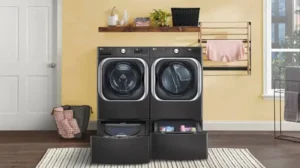
Smart washing machine: A weight sensor measures your load. The machine then picks the right water and soap amounts. You get a phone alert when the cycle ends.
Smart oven: You can preheat it from your phone. A built-in probe can track food temperature. The oven then warns you when dinner is ready.
Smart thermostat: It learns your daily schedule. It then cools or heats your home at the right times. Many users see lower energy bills.
Robot vacuum: Sensors map your rooms and avoid stairs. The app lets you set cleaning times and no-go zones.
How Smart Appliances Save Energy and Money
Smart devices can lower your power bills. They use sensors to avoid waste. They also run at smart times.
A smart dishwasher can wait for cheaper electricity hours. A smart air conditioner can turn off when nobody is home.
| Appliance | How It Saves Energy |
|---|---|
| Thermostat | Learns your schedule and trims extra heating or cooling |
| Washer | Measures the load and uses only the water it needs |
| Dryer | Stops once clothes are dry instead of running on a timer |
| Smart plug | Shuts off power to idle devices |
| Fridge | Tracks door use and cooling needs |
Important note: Savings depend on how you use each device. A smart appliance costs more upfront. Over time, the energy savings can help cover that price.
Are Smart Appliances Safe? Privacy and Security Tips
Smart appliances send data over the internet. That fact raises fair questions about safety. Hackers target weak home networks.
You can protect yourself with a few simple steps. Follow these tips when you set up a new device.
- Use a strong Wi-Fi password and the WPA3 setting if your router supports it.
- Change the default password on every appliance and app.
- Install updates as soon as the brand releases them.
- Turn on two-factor login in the app when possible.
- Buy from trusted brands that publish clear privacy rules.
Also, read what data the brand collects. Many apps let you limit sharing. A few minutes of setup can protect your family.
Pros and Cons of Smart Appliances
Smart technology is helpful, but it is not perfect. Look at both sides before you buy.
| Pros | Cons |
|---|---|
| Remote control from your phone | Higher price than basic models |
| Alerts that prevent mistakes | Needs steady Wi-Fi to work well |
| Possible energy savings | Privacy and hacking risks |
| Works with voice assistants | Some brands do not work together |
| Software updates add new features | Old models may lose support |
How to Set Up a Smart Appliance
Setup is easier than most people expect. The steps are almost the same for every brand.
- Plug in the appliance and turn it on.
- Download the brand’s app from your phone’s app store.
- Create an account and sign in.
- Connect the device to your home Wi-Fi. Use the 2.4 GHz band if the app asks for it.
- Name the appliance and test a simple command.
- Link your voice assistant if you want hands-free control.
If the setup fails, move your router closer. Weak signals cause most connection problems. Restarting the router also fixes many issues.
What to Check Before You Buy
Not every smart feature is worth paying for. Think about your daily needs first. Then compare a few models.
Check that the appliance works with your phone and voice assistant. Look for Matter support if you own devices from many brands. Read the warranty and the software update policy.
Also test your Wi-Fi strength near the spot where the appliance will sit. A fridge in a far corner may lose its signal. A cheap Wi-Fi extender can solve that.
The Future of Smart Appliances
Smart appliances keep getting better. More models will use AI to predict problems before they happen. Your washer may soon order its own part when a belt wears out.
Matter will also spread across more brands. That change will make mixed-brand homes much easier to build. Energy tools will grow too, helping homes match power use to cleaner grid times.
Frequently Asked Questions
How do smart appliances work with Wi-Fi and apps?
A smart appliance joins your home Wi-Fi like a phone does. The brand’s app then sends commands to it through the internet or your local network. You can start, stop, or check the device from anywhere.
Do smart appliances work without the internet?
Most still run their basic tasks without the internet. A smart oven can still heat food. You lose remote control, voice commands and updates until the connection returns.
Are smart appliances worth the extra money?
They help most when you value convenience and alerts. Energy savings can also lower the long-term cost. If you rarely use app features, a basic model may suit you better.
Can smart appliances be hacked?
Yes, any internet device carries some risk. You can lower that risk with strong passwords and regular updates. Two-factor login adds another layer of safety.
Do smart appliances work with Alexa and Google Assistant?
Many models do. Check the box or product page for supported assistants before you buy. Matter-ready devices usually work with several platforms.
What happens to a smart appliance if the brand stops its app?
The basic functions usually keep working. Smart features may stop or slow down. Pick brands with a clear promise about long-term software support.
Do smart appliances use a lot of electricity?
Their smart parts use very little power. Many models save more energy than they use. The savings come from better control and less waste.
Conclusion
Now you know how do smart appliances work behind the scenes. Sensors gather facts. A microprocessor makes choices. Wi-Fi and the cloud link everything to your phone.
The result is a home that saves time and often saves money. Start small with one device, like a smart plug or thermostat. Then add more as you grow comfortable.