
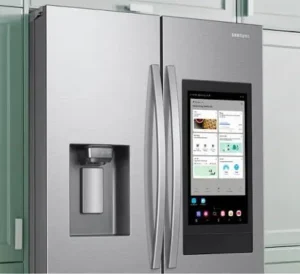
Why Smart Fridges Are Taking Over Kitchens
Your fridge is the one appliance everyone in the house uses every day. Samsung noticed this and put a touchscreen right on the door.
If you are hunting for the best samsung fridge with screen, this guide will help you choose with confidence. We cover screen sizes, key features, prices and common problems. You will also find a comparison table and a short FAQ.
What Is a Samsung Fridge With a Screen?
A Samsung fridge with a screen is a smart refrigerator with a built-in touch display. Samsung sells two main versions: Family Hub and AI Home.
Family Hub gives you a touchscreen fridge that knows what is inside, suggests recipes and plays music. The screen also works as a calendar, photo frame and note board for the whole family.
The smaller AI Home screen focuses on control. It lets you monitor and manage your fridge, range and laundry from one touchscreen.
What Makes the Best Samsung Fridge With Screen Stand Out?
A great smart fridge does more than look cool. It must keep food cold, save you time and stay easy to use.
Here are the main things to check before you pick a model.
- Screen size and clarity: Bigger screens show more widgets and apps.
- AI Vision Inside: Cameras track what you store.
- Smart home control: The fridge should link to your other devices.
- Cooling and storage: Good cooling matters more than any app.
- Price and software support: Updates keep the screen useful for years.
Samsung sells these features across several fridge styles. Let us look at the top choices.
Samsung’s Two Screen Options at a Glance
Samsung offers two screen sizes in the U.S. Each one suits a different kind of home.
| Feature | AI Family Hub+ (32-inch) | AI Home (9-inch) |
|---|---|---|
| Screen size | 32 inches | 9 inches |
| Best for | Families, entertainment lovers | Budget-minded smart home fans |
| Starting price (2025 launch) | About $4,699 | About $3,999 |
| Streaming apps | Yes, including YouTube and Spotify | Limited |
| Smart home control | Yes | Yes |
| AI Vision Inside | Yes | Yes |
Samsung launched the 9-inch model at $3,999 and the 32-inch Family Hub+ at $4,699. Prices change often, so check current deals before you buy.
Top Pick: Bespoke 4-Door Flex With AI Family Hub+ (32-Inch)
For most buyers, the best samsung fridge with screen is the Bespoke 4-Door Flex with AI Family Hub+. It has the biggest display in the lineup.
The 29 cubic foot model offers a 32-inch screen and a flexible lower-right drawer. You can set that drawer as a fridge or a freezer
What You Get on the 32-Inch Screen
The large display feels like a tablet built into your kitchen. It runs apps such as YouTube, TikTok, Spotify, Samsung Food and free Samsung TV.
You can also share photos, leave handwritten notes and sync family calendars. Google Photos lets you send pictures straight to the screen. Kids love drawing on the whiteboard too.
What Reviewers Say
Engadget reviewed a counter-depth French door version of this style. The site praised the big display, the beverage center and the AI ingredient tracking.
The same review listed a few weak spots. It called the fridge expensive, noted limited AI food recognition and wanted more responsive touch input. Engadget
Pros:
- Huge, bright screen
- Strong smart home hub
- Flexible storage drawer
Cons:
- High price
- AI food tracking misses some items
Best Value Pick: Bespoke AI With the 9-Inch AI Home Screen
Not everyone needs a TV on the fridge door. If you want smart features without the big price, the 9-inch AI Home screen is the better deal.
This is the best samsung fridge with screen for people who value control over entertainment. It tracks food, shows recipes and runs your SmartThings devices.
Samsung added this screen to its 4-Door and Side by Side refrigerators. That gives you more design choices than before. samsung
Space matters too. A smaller screen means a cleaner look and you still get the same AI Vision camera tech inside.
Meet the Smart Features Inside Your Fridge
The screen is only the front door to a bigger system. Let us walk through the features that matter most.
AI Vision Inside
Cameras inside the fridge scan your shelves when you close the door. The system recognizes what is inside, so you always know what you have. samsung
You can check the contents from your phone while you shop. That cuts double purchases and food waste.
Keep one limit in mind, though. AI Vision Inside cannot list items in door bins or the freezer. You may need to fix the list by hand now and then. samsung
Smarter Updates in 2026
Samsung keeps adding features through software. In May 2026, it announced a major update for Bespoke AI Family Hub fridges sold in the U.S. samsung
The update brings wider food recognition, daily widgets and better Bixby voice control. It also sends alerts when items you buy often need to be replaced. samsung
Voice commands now feel more natural. You can ask Bixby to turn on Power Cool when the outdoor temperature hits 90°F. samsung
Entertainment and Family Tools
The screen works as a family message center. You can mirror your phone, stream music and watch live TV while you cook.
Tapping a Galaxy phone on the fridge also lets you view content on the screen. That makes sharing recipes quick and easy. samsung
Smart Home Control
The fridge doubles as a SmartThings hub. You can control smart devices and track your energy use from the screen. samsung
Set a monthly goal and the fridge warns you when you get close.
Cooling and Storage Still Come First
A smart screen means little if your milk spoils. Always check the cooling system and layout.
Many Samsung models use a Twin Cooling system, which keeps fridge and freezer air separate. This helps hold cold air in even when the door is open. samsung
Some newer models add extra freshness tech. Hybrid Cooling uses a small Peltier module to keep produce fresh longer. This feature appears only on select models, so check the spec sheet. samsung
Look at the door style too. Four-door French door models give you the most flexible space, while side-by-side models save floor room in tight kitchens.
How to Choose the Best Samsung Fridge With Screen for Your Home
Picking the right model gets easier when you know your habits. Use this simple checklist.
First, measure your space. Check the width, depth and door swing before you fall in love with a model.
Second, decide how you will use the screen. Heavy users who stream, share photos and manage a busy family calendar should pick the 32-inch model. Light users will enjoy the 9-inch screen just as much.
Third, set a budget that includes delivery and setup. Samsung offers delivery, haul away and installation on select models. samsung
Fourth, plan for Wi-Fi. You need a Wi-Fi connection and a Samsung account to use AI Home features. Without them, the fridge still cools, but the smart tools stay locked. samsung
Pros and Cons of a Samsung Fridge With a Screen
Smart fridges bring real perks, but they also bring tradeoffs. Weigh both sides before you spend thousands.
| Pros | Cons |
|---|---|
| Check your fridge from anywhere | Higher price than regular fridges |
| Cuts food waste with expiry alerts | AI food tracking is not perfect |
| Works as a family message board | Needs Wi-Fi and a Samsung account |
| Controls all SmartThings devices | Touch screen may lag at times |
| Gets new features through updates | Repairs can cost more |
Most owners say the daily convenience is worth it. Still, if you only want cold storage, a standard Bespoke model will save you money.
Tips to Get the Most From Your Smart Fridge
A few simple habits will make your screen far more useful.
Add your family’s phones to the calendar widget on day one. Everyone then sees the same plans every morning.
Use the expiry tracker for leftovers and homemade foods. You can register items and their expiration dates, then get alerts before they expire. samsung
Turn on automatic updates so you get new features without extra effort. Samsung will alert you on the screen when an update is ready.
Finally, place heavy items on shelves the camera can see. This helps AI Vision Inside spot more of your food.
Conclusion
Samsung leads the smart fridge market with two strong screen options. The 32-inch Family Hub+ gives you a full kitchen entertainment hub, while the 9-inch AI Home keeps costs lower.
For most families, the best samsung fridge with screen is the Bespoke 4-Door Flex with AI Family Hub+. It combines a huge display, flexible storage and steady software updates.
If you want a lighter, cheaper smart fridge, choose the 9-inch AI Home version. Either way, visit the official Samsung Family Hub page to check current deals and specs.
Frequently Asked Questions
What is the best Samsung fridge with screen for a large family?
The Bespoke 4-Door Flex with AI Family Hub+ is the top choice for big households. It has 29 cubic feet of space and a 32-inch screen for calendars, notes and photos.
Does a Samsung fridge with a screen need Wi-Fi?
Yes, it needs Wi-Fi to run smart features. The fridge still cools without a connection, but apps, widgets and remote viewing will not work.
How much does a Samsung Family Hub fridge cost?
Prices start near $3,999 for 9-inch AI Home models. The 32-inch Family Hub+ launched at about $4,699, though sales often lower these numbers.
Can the screen see inside my fridge?
Yes. AI Vision Inside takes pictures of your shelves and you can view them on the screen or your phone. It cannot see door bins or the freezer.
Does Samsung update the screen software?
Yes. Samsung rolls out over-the-network updates that add new features. The May 2026 update improved food recognition and Bixby voice control.
Is a smart fridge worth the extra money?
It depends on your habits. Busy families who share calendars and shop often will gain the most, while simple cooling needs cost less with a standard model.