Working from home can feel comfortable, but a poorly planned workspace can make daily tasks harder. The right home office essentials can help you create a clean, comfortable and productive area without spending too much money.
A good home office does not need to look expensive or complicated. You mainly need practical furniture, useful technology, proper lighting and a setup that helps you stay organized throughout the day.
What Are Home Office Essentials?
Home office essentials are the basic items that help you work, study, attend meetings and manage daily tasks from home. These products can range from a desk and chair to a computer, desk lamp, storage tools and other useful accessories.
The best setup depends on your work style, available space and budget. You should choose products that improve comfort, organization and productivity instead of filling your workspace with unnecessary items.
Why Is a Good Home Office Setup Important?
A well-designed workspace can make working from home easier and more comfortable. When everything has a specific place, you can spend less time looking for documents, chargers, notebooks and other supplies.
Comfort also matters during long working hours. A suitable chair, correct desk height and good lighting can make your workspace more pleasant and support better working habits.
Your workspace can also affect concentration. Keeping personal distractions away from your main work area helps create a clear difference between work time and relaxation time.
Essential Home Office Furniture
Furniture forms the foundation of your workspace. You do not need a large room or expensive furniture, but every major item should match your available space and working needs.
Home Office Desk
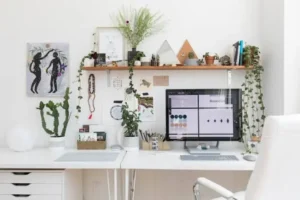
A desk gives you a dedicated surface for your computer, keyboard, documents and other work items. Choose a desk with enough space for your daily equipment without making the room feel crowded.
A desk with drawers can provide extra storage for stationery and documents. If you have limited space, a compact desk can work well for laptops and basic office equipment.
Ergonomic Office Chair
A chair is one of the most important home office essentials because you may spend several hours sitting while working. Look for a chair that provides adjustable height and comfortable back support.
Your feet should rest comfortably on the floor while you sit. You should also keep your monitor at a comfortable viewing height instead of constantly looking downward.
Bookshelf or Storage Cabinet
Storage helps keep your workspace organized and reduces visual clutter. A small bookshelf, cabinet, or set of storage boxes can hold books, files, office supplies and equipment.
You can use vertical storage when floor space is limited. Wall shelves can provide useful storage without taking up much room around your desk.
Technology You Need for a Home Office
Modern remote work often depends on technology. Your computer, internet connection and communication equipment should support the type of work you perform every day.
Computer or Laptop
A laptop or desktop computer is usually the main device in a home office. The right option depends on your work, software requirements, screen size preferences and budget.
For basic writing and browsing, you may not need a powerful computer. Designers, video editors, developers and other demanding users may require stronger hardware.
External Monitor
An external monitor can give you more screen space while working. It can be especially useful when you regularly compare documents, research information, manage spreadsheets, or work with multiple applications.
You can also use a monitor with a laptop to create a larger desktop workspace. Make sure the screen sits at a comfortable height and distance.
Keyboard and Mouse
A separate keyboard and mouse can make a desktop-style setup more comfortable. Wireless options can also reduce cable clutter and give your desk a cleaner appearance.
Choose devices that feel comfortable during regular use. You do not need expensive accessories if simple models meet your daily requirements.
Headphones or Headset
Headphones can help during online meetings and calls. A headset with a built-in microphone can also make communication easier when working in a busy home.
Noise-reducing headphones may help limit background sounds. However, your choice should depend on your environment and how often you attend meetings.
Home Office Lighting Essentials
Lighting plays an important role in a comfortable workspace. A dark desk can make reading screens and documents more difficult, while excessive glare can make your monitor uncomfortable to view.
Natural light can brighten your workspace during the day. Place your desk near a window when practical, but avoid positioning the monitor where direct sunlight creates strong reflections.
A desk lamp can provide focused lighting when natural light is limited. Adjustable brightness and a flexible lamp head can make it easier to direct light where you need it.
| Lighting Option | Best Use | Main Benefit |
|---|---|---|
| Natural light | Daytime work | Brightens the workspace |
| Desk lamp | Reading and evening work | Focused illumination |
| Ceiling light | General room lighting | Covers the whole room |
| Monitor light | Screen-focused work | Reduces desk clutter |
Organization Tools for a Home Office
An organized workspace can make daily work easier. Simple storage products can prevent cables, papers, pens and small accessories from spreading across your desk.
Desk organizers can hold pens, sticky notes, scissors and other frequently used items. File folders can help separate important documents from everyday paperwork.
Cable management also deserves attention. Cable clips, sleeves and organizers can keep charging cables and computer wires under control.
Useful Organization Items
You can keep several basic supplies close to your desk, including:
- Desk organizer
- File folders
- Cable clips
- Storage boxes
- Pen holder
- Sticky notes
- Document tray
The goal is not to fill your desk with organizers, but to give frequently used items a clear and convenient place.
Home Office Accessories That Improve Productivity
Small accessories can make a noticeable difference when they solve a real problem. A monitor stand, desk mat, USB hub, or charging station can improve how you use your workspace.
A monitor stand can raise your screen and create storage space underneath. A USB hub can provide additional ports when your laptop has limited connections.
A desk mat can protect the surface and create a defined working area. A simple clock or planner can also help you keep track of tasks without constantly checking your phone.
Internet and Power Backup
A reliable internet connection is important for remote workers, students and online businesses. Video meetings, cloud applications, file transfers and web-based tools can all depend on a stable connection.
Power interruptions can also interrupt important work. Depending on your location and needs, a UPS or suitable backup power solution can help keep essential equipment running during short outages.
You should also use safe power practices. Avoid overloading power strips and replace damaged cables or adapters instead of continuing to use them.
Home Office Essentials for Small Spaces
You do not need a separate room to create a useful home office. A small corner, bedroom area, or unused section of a living room can become a practical workspace.
Choose furniture that matches the available space. A compact desk, wall shelf, foldable table, or vertical organizer can provide useful functionality without taking over the room.
Multi-purpose furniture can also work well. For example, a desk with built-in storage can provide both a work surface and a place for office supplies.
Home Office Essentials on a Budget
Creating a home office does not require a large investment. Start with the items that directly affect your ability to work, then add accessories when you identify a genuine need.
For many people, the first priorities include a suitable desk, comfortable chair, computer, reliable internet and adequate lighting. You can upgrade other parts of the workspace gradually.
| Item | Priority | Budget-Friendly Approach |
|---|---|---|
| Desk | High | Choose a simple sturdy design |
| Chair | High | Focus on comfort and adjustability |
| Computer | High | Match specifications to your work |
| Lighting | Medium | Use natural light with a desk lamp |
| Storage | Medium | Use shelves or storage boxes |
| Cable management | Low | Start with inexpensive clips |
This approach prevents unnecessary spending. Build your workspace around your actual daily tasks instead of buying every office accessory you see online.
How to Choose the Right Home Office Equipment
Choosing equipment becomes easier when you first understand how you work. Someone who writes articles may need a different setup from someone who edits videos or manages large spreadsheets.
Consider your available space, working hours, technology requirements, storage needs and budget before buying anything. This simple process can help you avoid products that look useful but rarely solve a real problem.
You should also check product dimensions before ordering furniture. A desk that looks suitable online may take up too much space once you place a monitor, keyboard and other equipment on it.
How to Keep Your Home Office Clean
A clean workspace can make the room feel more comfortable and organized. Dust can collect around keyboards, monitors, shelves and other office equipment, so regular cleaning matters.
Wipe suitable surfaces with appropriate cleaning materials and follow the manufacturer’s instructions for electronic devices. Avoid applying liquid directly to computers, monitors, keyboards, or other electronics.
You can also create a simple weekly cleaning routine. Remove unnecessary papers, organize cables, empty waste bins and return office supplies to their proper places.
For more cleaning ideas, see our guide on How to Disinfect Floors and explore our Cleaning Tools category.
How to Create a Productive Home Office Routine
Your physical setup is only one part of productive remote work. A simple routine can help you separate working hours from personal time.
Start your day by preparing your workspace and identifying the main tasks you need to complete. Keep your phone and unrelated distractions away when you need focused working time.
Short breaks can also help you reset during long sessions. Stand up, move around, drink water and return to your desk when you are ready to continue.
Smart Ways to Improve Your Home Office
Once your basic setup works well, you can add smart accessories that solve specific problems. Smart plugs, task lighting, charging stations and other connected devices can simplify everyday routines.
However, technology should support your workflow rather than create more distractions. A simple workspace with reliable equipment can be more useful than a desk filled with gadgets you rarely use.
You can also explore our guide to Smart Home Tips & Guides for more ideas that can improve everyday home living.
Common Mistakes to Avoid in a Home Office
One common mistake is choosing furniture based only on appearance. A stylish desk or chair may look attractive, but it should also provide enough space and comfort for regular work.
Another mistake involves poor cable management. Too many loose cables can make cleaning harder and create unnecessary clutter around your workspace.
Many people also ignore lighting. A beautiful desk cannot compensate for a workspace that feels dark, uncomfortable, or full of screen glare.
Finally, avoid buying products simply because they are marketed as office must-haves. The best workspace includes items that match your personal tasks and solve real problems.
Home Office Essentials Checklist
Before finishing your workspace, review the main areas of your setup. Make sure you have the equipment required for your work before spending money on decorative accessories.
| Category | Recommended Items |
|---|---|
| Furniture | Desk, office chair, storage |
| Technology | Computer, monitor, keyboard, mouse |
| Lighting | Desk lamp, natural light |
| Organization | File folders, organizer, cable clips |
| Communication | Headset, microphone if needed |
| Power | Power strip, UPS if required |
| Accessories | Monitor stand, desk mat, USB hub |
This home office essentials checklist can help you identify missing items and prioritize purchases. Start with the basics and improve the workspace gradually as your needs change.
Frequently Asked Questions
What are the most important items for a home office?
The most important items usually include a suitable desk, comfortable chair, computer, reliable internet and adequate lighting. Your specific equipment needs will depend on the type of work you perform.
How can I create a home office in a small room?
Use compact furniture and vertical storage to save floor space. A small desk, wall shelf and cable organizers can turn an unused corner into a practical workspace.
Is an expensive office chair necessary?
An expensive chair is not always necessary. Focus on adjustability, comfortable support, suitable height and a design that works well for your body and daily routine.
How can I organize cables in my home office?
Use cable clips, sleeves, ties, or a cable management box to keep wires together. Labeling important cables can also make future maintenance easier.
What lighting is best for a home office?
A combination of natural and artificial light can work well. Use a desk lamp when you need focused illumination and position your monitor to reduce distracting glare.
How much space do I need for a home office?
You can create a functional workspace in a small area. The key is having enough room for your computer, essential equipment, comfortable seating and the movements required for your work.
What should I buy first for a home office?
Start with the items that directly affect your work, such as a desk, chair, computer, internet connection and lighting. Add accessories after you understand what your workspace actually lacks.
Conclusion
Creating a useful workspace does not mean buying expensive furniture or filling your room with technology. The right home office essentials should make your work easier, keep your equipment organized and provide a comfortable environment for daily tasks.
Start with the basics and build your setup according to your work style, available space and budget. A simple, organized and comfortable workspace can support better daily habits without unnecessary spending.
For more practical ideas, explore SmarterAura’s Home Essentials and Smart Home Tips & Guides sections for additional ways to improve your home.